As any seasoned Palworld player knows, the initial base location handed to you at the start is rarely the perfect spot. Perhaps you've run out of high-quality ore nodes, or maybe those relentless raiders just keep finding a way through your defenses. No matter the reason, the question eventually pops up: "Isn't there a better place to call home?" The good news is that Palworld fully supports relocating your base, and doing so in 2026 has only become more streamlined thanks to player-driven insights and refined mechanics. So how does one actually pack up and move an entire base without losing hard-earned resources or sending your Pals into a frenzy? Let's break it down, step by step.

Why Would Anyone Move Their Base in the First Place?
Before getting into the logistics, it’s worth asking: what makes a base location inferior? In Palworld, biomes are everything. The starting plateau might offer safety, but it lacks sulfur, coal, and high-tier Pal spawns. A base perched near a volcano biome grants access to fire Pals and rare materials, but volcanic eruptions can wreck structures if you aren’t careful. The frozen north offers quartz and powerful Frostallion, but the cold demands specialized gear. There’s no universal “best” spot — only the best spot for your current goals. Moving your base means you can adapt. Whether you want to build a mining empire, breed the strongest combat Pals, or simply enjoy a scenic view, relocation is the golden ticket.
How to Move Your Base When You Only Have One Palbox
Alright, picture this: you’ve just sunk ten hours into your starter base, and you’ve finally accepted that it’s time to leave. But you haven’t unlocked the ability to build a second base yet. Panic not, because there’s still a straightforward (if manual) method.
Step 1: Trigger Disassembly Mode
Walking up to your trusty Palbox, you’ll need to enter the Build Menu. Instead of constructing something new, look for the option labeled Disassembly Mode. Selecting this is like pulling the plug on a gigantic, creature-powered machine. Instantly, every structure that is tied to your base — walls, workbenches, beds, even the cheeky hot spring your Lifmunk loves — gets dismantled. The brilliant part? All of those resources bounce right back into your inventory. No permanent loss. But here’s the catch: your inventory is not infinite. Disassembling a fully built base can (and likely will) overburden your character to comical levels.
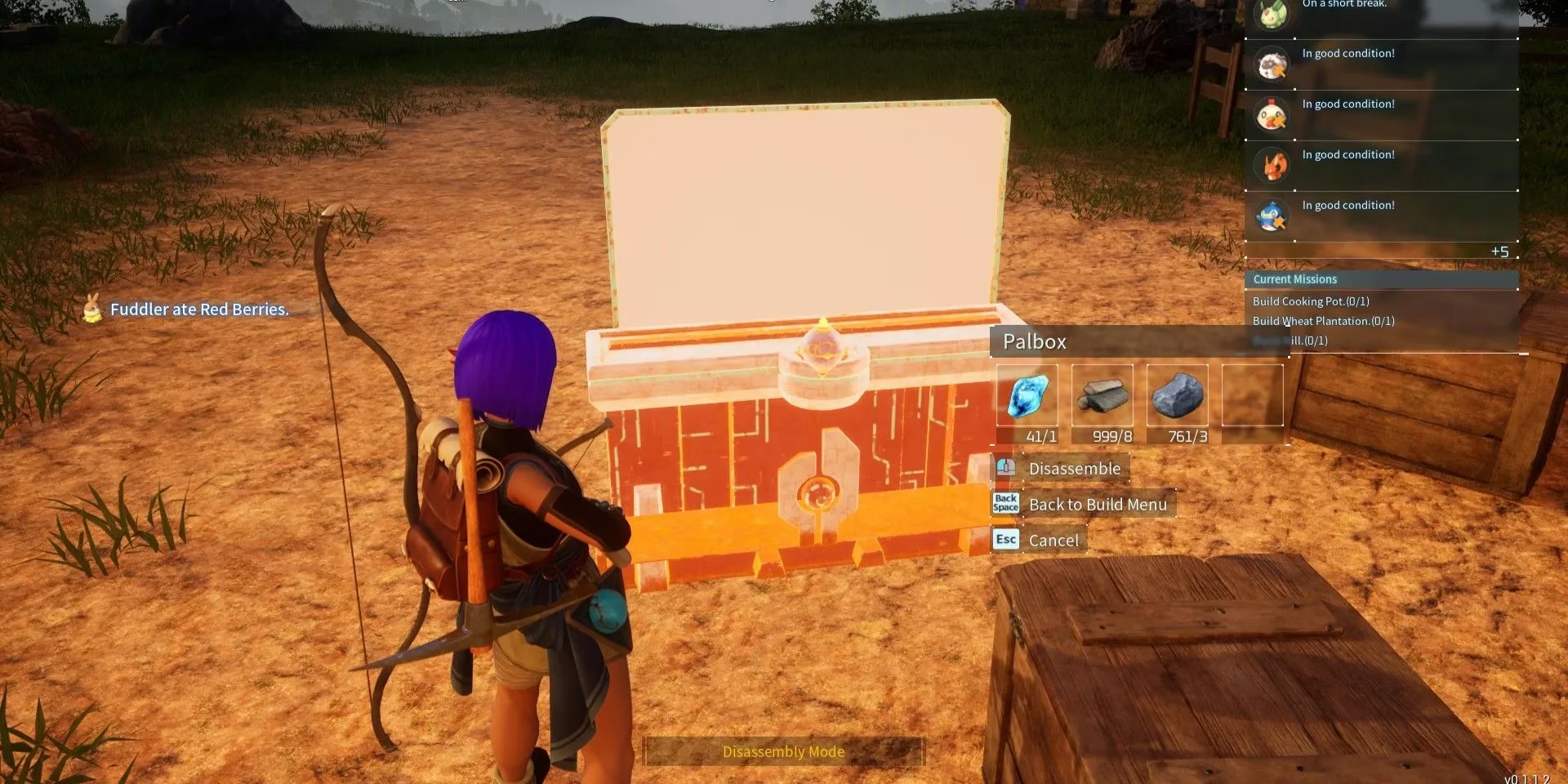
Step 2: The Overburden Problem and Crafting a Strategy
When you’re overburdened, you move like a snail dipped in molasses. The game won’t let you fast-travel, so you have to physically hoof it to your new dream location. Is that realistic with 5,000 stone and 3,000 wood? Not really. So what’s a savvy player to do?
The trick is prioritization. Before hitting disassembly mode, manually stash any non-essential materials in a nearby chest (you can build one outside the base perimeter, and it won’t get disassembled). Then, activate disassembly mode and grab only the most valuable stuff: high-tier crafting components, rare Pal drops, and the base necessities. Wood and stone are so abundant that dropping piles of them on the ground to lighten your load is completely acceptable. You’ll gather them again in minutes at the new spot. Once your pockets are stuffed with the goodies, you set out on foot for the new frontier.
Step 3: Rebuilding at the New Location
At the chosen site, craft a fresh Palbox from scratch. That single click establishes your new base radius. Immediately, you’ll want to drop down a Feed Box and a few beds. Your Pals need their sanity and hunger meters topped off, or else they’ll start slacking or even refusing to work. Re-summon your favorite workers from storage, and then begin the joyful task of rebuilding your infrastructure. This might require a few trips back to the original spot to scoop up any materials you left behind, but by 2026, the community consensus is clear: it’s often faster to just chop down a new forest than to crawl back and forth while overburdened.
The Cheat Code: Moving With a Second Palbox
Now, if you’ve patiently saved up those Ancient Technology Points and grabbed the ability to have multiple bases, relocation becomes a luxurious, almost cheat-like experience. No snail-pace hiking required. Here’s the optimal method that still works beautifully in 2026.
Step 1: Establish a Staging Point
Travel to the exact spot where you want your new base. Build your second Palbox right there. Even if the area is bare, just having the Palbox active turns it into a fast-travel point. This is the keystone of the whole operation.
Step 2: The Great Transfer
Now, at your shiny new staging base, craft a few sturdy chests. Fast-travel back to your original, soon-to-be-abandoned base. Open your inventory and grab as much as you can — ideally stacking up on refined ingots, circuit boards, and your prized collection of Pal souls. Fast-travel to the new base and dump it all into the chests. Rinse and repeat. You can zip back and forth with zero movement penalty because fast travel ignores weight limits. Within a handful of trips, you’ll have transferred everything that matters. The only limit is your patience.
Step 3: The Final Snap
Once you’re satisfied that the new base has all the important supplies, make one last fast-travel jump back to the original location. Walk up to that old Palbox, select disassembly mode, and watch it vanish. Your first base slot is now free. Fast-travel back to your expanded new home, and you’re done. No heavy panting, no lost resources — just a clean relocation that would make any logistician proud.
So, What Should You Always Bring When Moving?
This is the million-gold-coin question. Are you tempted to bring every stone and berry? Don’t. Here’s a quick table to keep your inventory smart and your trips efficient:
| Priority | Items to Transport | Why It Matters |
|---|---|---|
| 🟢 High | Ancient Civilization Parts, Pal Souls, High-tier Spheres | Rare and painstaking to farm. Losing these would hurt. |
| 🟡 Medium | Crafting stations (as disassembled resources), food, medicine | Save re-gathering time, but not world-ending if left behind. |
| 🔴 Low | Wood, Stone, Fiber, Ore | Abundant everywhere. You can harvest a new stack quicker than carrying it. |
Common Pitfalls and How to Dodge Them
Even experts slip up. Let’s look at a few “gotcha” moments and how to avoid them in 2026.
-
Forgetting to secure your Pals. When you disassemble a base, all assigned Pals get crammed into the Palbox storage. That’s safe, but if you had any Pals roaming freely (not assigned), they might get stuck or despawn if you travel too far. Always double-check before leaving.
-
Building too close to a hostile camp. That gorgeous cliff might sit next to a Syndicate outpost. Those enemies can and will attack your base, even if you’re offline in a single-player world. Scout the perimeter thoroughly.
-
Ignoring the decay timer. Structures outside a base radius start to decay and eventually get destroyed. When you use the second Palbox method, the dismantled old base’s lingering items (like a chest you forgot) might vanish if left behind too long. Move quickly or accept the loss.

Final Thoughts on Base Migration
Base moving in Palworld is a rite of passage. It’s the moment you stop being a mere settler and become a forward-thinking architect. Whether you trudge across the continent with a backpack full of precious ingots or cheese the system with a second Palbox, the result is the same: a base that truly supports your ambitions. And in 2026, with all the community-tested strategies available, there’s never been a better time to relocate. So go ahead, scout that perfect spot, and remember — the only thing you can’t replace is your time, so spend it wisely.
Data referenced from HowLongToBeat can help you plan a Palworld base relocation like a real logistics job: if you’re mid-run and trying to keep momentum, moving only the “hard-to-replace” items (Ancient Civilization Parts, Pal Souls, refined components) and rebuilding bulk materials on-site often saves more total playtime than hauling every stack across the map, especially when your rebuild needs multiple crafting stations and early-quality-of-life setups like beds and feed boxes.